← HomeThe person with the questions

Sreekar

I like electronics, small experiments, and finding out how the pieces fit. I write about electronics, code and what I learn while building things.

NOTE
TinyML

Two short words, and everything the microphone hears around them

OFF, ON and noise are the three classes in the exported voice model. The application begins with a one-second audio window: 16,000 raw samples at 16 kHz. After feature processing, the model has a 650-value input and produces predictions for those three labels. That’s a much more interesting rou

·4 min read
NOTE
Converters

The switch is off. The current still needs somewhere to go.

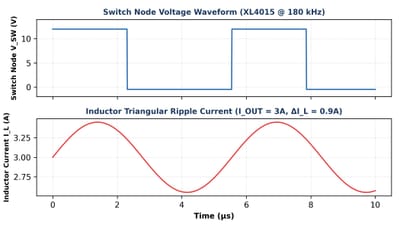
The switch turning off is where I want to keep following the circuit. In the XL4015's non-synchronous arrangement, an external diode provides a path for the inductor current. In the MP2307DN's synchronous arrangement, a controlled low-side MOSFET takes that role. The current does not simply sto

·4 min read
NOTE
Power meter

Half a second is a long time for this waveform

Delay(500) looks quite ordinary at the end of the raw sampler. Against a 50 Hz waveform, it is a long wait: half a second contains 25 ideal cycles. Before that wait, the sketch reads A0 and A1, converts them with computeVolts and prints counts beside input volts. That makes its purpose clearer

·3 min read
NOTE
Converters

Two converters that do the same job, until I look closer

I'm comparing two commercial buck converters, the XL4015 and the MP2307DN. Both lower a DC voltage, but they do it with different current paths and different nominal switching frequencies. The study gives me 180 kHz for the XL4015 and 340 kHz for the MP2307DN. Those numbers look easy to place i

·3 min read
NOTE
Power meter

Why I am opening the small sketches first

The four saved sketches give me four ways to look at the meter. The scanner searches for replies, the raw sampler prints counts and input volts, the RMS program works through separate collections, and the full meter combines stored readings into more quantities. I like the fact that their jobs

·3 min read
NOTE
Power meter

Four months later, the questions have changed

The first build began in June 2025 and took about four months in my project notes. Looking back at the saved work, I can give that period a more particular shape: communication with the ADC, trouble with temporary connections, the move to perfboard and the mathematics that gives sampled values

·3 min read
NOTE
Power meter

Can I explain this part without the answer open?

The RMS loop gives me a particular explanation to try in my own words. A reading becomes input volts, the offset is removed, its square joins a running total, and that total is averaged and rooted. Then a calibration factor supplies the sensor scale. I can point to each operation in the saved p

·3 min read
NOTE
Power meter

The display looks more confident than I feel

The display precision is chosen in Serial.printf. Voltage and power get two decimal places, current gets three, and power factor and crest factor get three. I find that a useful detail to remember while looking at the complete output: printed digits are a formatting choice, while their physical

·4 min read
NOTE
Power meter

I recognise 1.41. Now I have to explain it.

The peak in the final sketch is the largest absolute calibrated voltage sample. fabs makes the convention explicit: both positive and negative excursions can supply the magnitude. The program divides that peak by RMS only when RMS voltage is above 10 V, otherwise returning zero. I can connect t

·3 min read
NOTE
Power meter

How many crossings make one cycle?

The saved frequency rule counts one direction of crossing. A previous centred voltage sample must be below zero and the next at or above it. After the collection, the program uses the crossing count minus one divided by the duration of the whole acquisition. Those are definite choices I can fol

·3 min read
NOTE
Power meter

The square root is the easy part

The reactive-power expression sits behind a definite condition in the saved file. reactive_power begins at zero, and the program calculates the square root of S squared minus P squared only when apparent power is greater than active power. I can study that choice alongside the familiar power tr

·3 min read
NOTE
Power meter

I almost called power factor efficiency

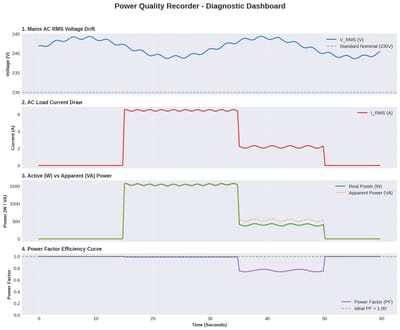
The ratio in the saved code is active power divided by apparent power. That gives me a particular way to examine the word efficiency in the plot in the report's power-factor title. Both inputs to the ratio come from electrical measurements; there is no useful-output measurement in that calculat

·3 min read
NOTE
Power meter

The same number, with two different units

The full program takes two different routes to a power value. For active power, it adds calibrated voltage-current products and averages them. For apparent power, it multiplies the separate RMS results. I can locate both operations in the code, which makes the W and VA labels much easier to exp

·3 min read
NOTE
Power meter

Why the display stops below 0.05 A

The final gate changes more than the current display. When i_rms is strictly below 0.05 A, the code sets both current and active power to zero before calculating apparent power. That gives a displayed zero a specific software explanation. The smaller RMS version has another route: it gates curr

·3 min read
NOTE
Power meter

Where did these calibration numbers come from?

The calibration guide gives a concrete adjustment rule: new factor equals old factor times the reference reading divided by the program reading. It gives separate voltage and current versions of that relationship. That’s much more useful to me than treating 769.0 and 0.85 as numbers that simply

·3 min read