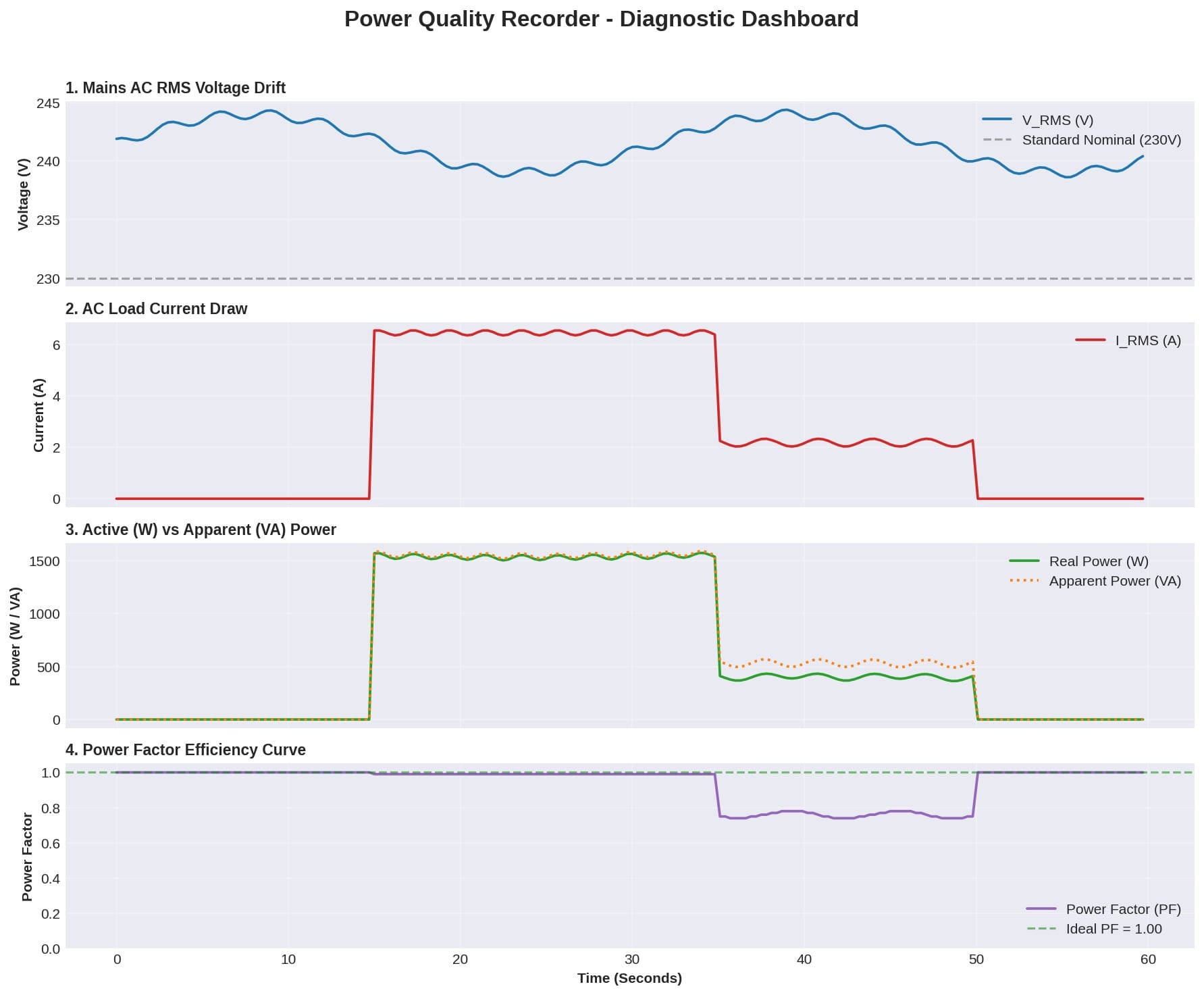
The display precision is chosen in Serial.printf. Voltage and power get two decimal places, current gets three, and power factor and crest factor get three. I find that a useful detail to remember while looking at the complete output: printed digits are a formatting choice, while their physical meaning comes from everything before them. The four-panel plot in the report brings several quantities together over 60 seconds, making those dependencies much easier to see side by side.
I started by wanting readings. Now I keep looking behind them. Which samples produced this value? What interval does it describe? Has the offset been removed? Which calibration value belongs to this version? None of those questions is visible just because the label is nicely arranged. The display is the end of the route, while most of the work I'm still thinking about happened before it.
The diagnostic plot brings several relationships into one view. Its current panel rises from zero to a larger plateau, then drops to a smaller one before returning to zero. In the power panel, the active and apparent curves are close in one region and visibly separate in another. I can use those illustrated shapes to explain why a change in current and a change in the relationship between power quantities are different things to notice. The shape gives the discussion a specific comparison.
That changes the kind of reading I can give it. I can use it to discuss what the different quantities mean and what I would want to examine. I can't recover the exact test setup from the shape of a line. Those details need to come from the source of the data.
I'm trying to imagine someone opening the project without having followed the earlier work. They would see the output first. If I were that person, I would probably assume the displayed precision was there for a reason. I wouldn't know which values had been compared with a reference, which were calculated from other readings or which questions were still open. That makes the explanation beside the display part of the project too.
More digits can be particularly convincing. The program can print them because it has a number in memory, but the number of printed decimal places isn't the same as the accuracy of a measurement. If an earlier stage is uncertain, adding digits at the end doesn't reduce that uncertainty. I knew this as a general idea; it feels more immediate when I’m the person choosing what the screen should show.
I'm also thinking about how one quantity depends on another. A current reading is not an isolated tile once it enters the power calculation. Voltage and current feed into other values, and those feed into a ratio. A small problem earlier in the route can appear in more than one place on the screen. Several believable-looking outputs might share the same unresolved input rather than independently confirm one another.
The plot has separate views for RMS voltage, load current, active versus apparent power and power factor. The program's acquisition has its own sequence: collect the arrays, calculate the results, print them and wait another second. A graph's smooth line does not replace that timing explanation. I can use the panels to discuss relationships while keeping the screen's appearance connected to actual computations. Several plausible-looking fields may share the same input or calibration, rather than independently confirm one another.
That’s why I'm returning to one value at a time. I want to choose a displayed quantity and explain its whole path in ordinary words. For apparent power, I should be able to point to the RMS voltage and current used. For real power, I should explain the products and averaging. For power factor, I should know what went into both sides of the division. If I get lost, the gap is easier to find in one route than in the complete screen.
The display threshold on current is another detail worth keeping visible in the notes. A clean zero can be partly the result of a software rule. That doesn't make the rule pointless, but a reader should understand what a zero does and doesn't tell them. I don't want the appearance of a steady screen to quietly replace the question of what the sensor and calculation were doing underneath it.
There’s a difference between making the output readable and making it look more certain than the evidence allows. I can work on labels, units and sensible organisation without pretending that every remaining measurement question is solved. In fact, clear labels should help expose the distinction. The best-looking arrangement would be of little use if I still had to guess whether a particular line meant watts, volt-amperes or something else.
For a fuller record, I want the screen and the relevant calculation kept together. A picture of the result is useful, but it leaves out the version of the program, the conditions and what was being checked. The raw observations, when available, matter as well. Otherwise I could return to a familiar screenshot and remember the feeling of progress more clearly than the reason I trusted its numbers.
I'm not trying to take the satisfaction out of reaching this stage. The physical assembly, the communication and the calculations have each given me enough to work through. Seeing a route from a sensor to a screen is still exciting. I just find the route more interesting now than the screen on its own. There are decisions inside it that I wouldn't have noticed at the beginning.
This is probably why the graph is useful even with its limits clearly stated. It brings the separate quantities into one place and gives me a reason to ask how they belong together. I can use it as a map for the next review: follow this reading, check this relationship, find the source of this curve. That’s a more useful role than treating the picture as the last word on the meter.
The complete display is satisfying because I can follow more of the route behind it. Labels, digits and curves become useful when they help explain that route, instead of taking its place.