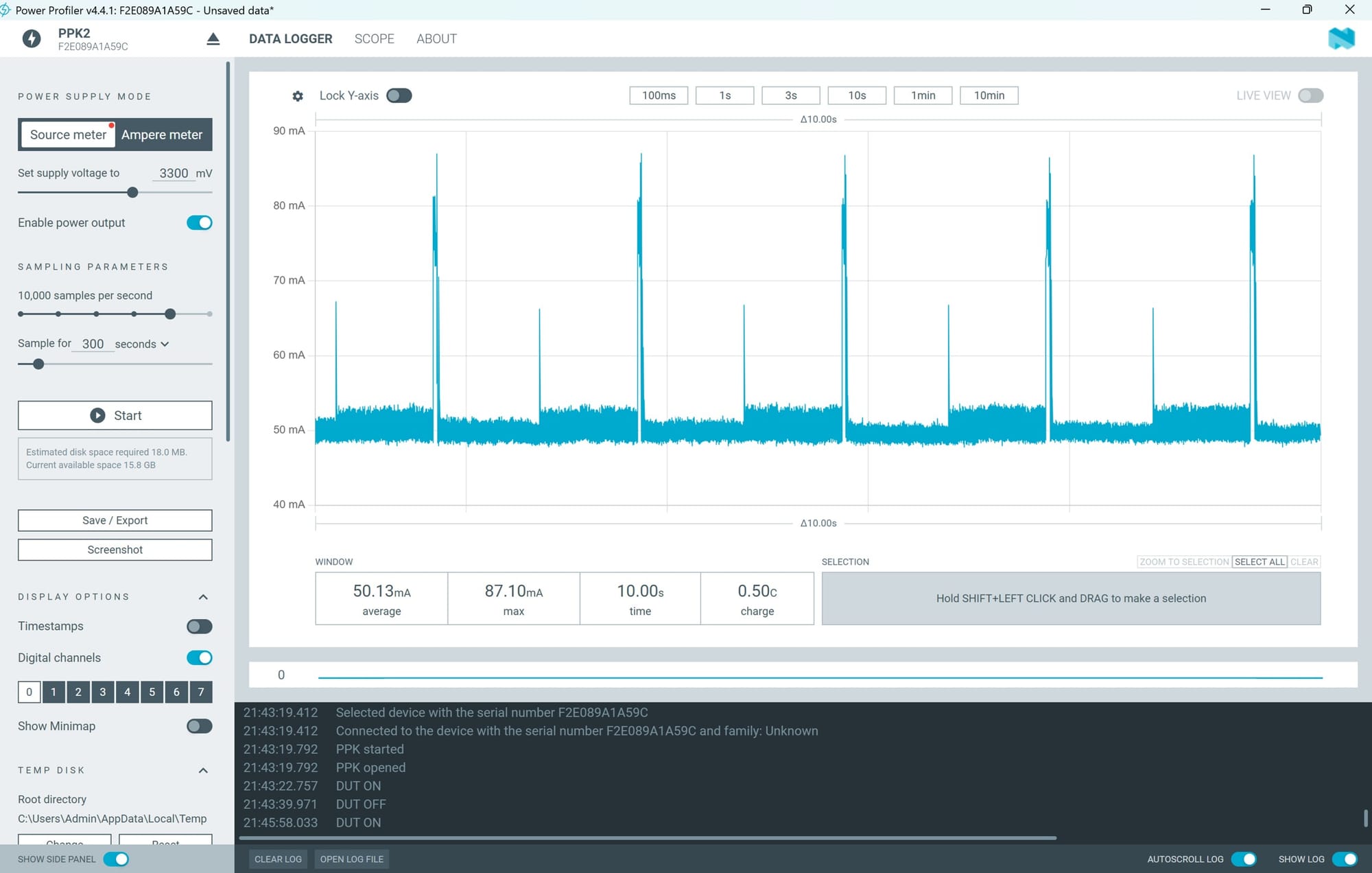
The PPK2 views show two different electrical windows at a 3.3 V source setting. The wider view covers 10 seconds, with 50.13 mA average current, 87.10 mA maximum and 0.50 C of charge. The closer view covers 257.8 ms, with 54.44 mA average, 87.85 mA maximum and 14.04 mC. The time boundary is part of what each set of numbers means.
I like seeing software as a changing current, but a peak does not name a function. The application captures audio, processes it, prints results and waits. Its profiling pin also includes a deliberate 100 ms wait before the timed call. Reading the graph therefore means keeping the window and the code sequence together, rather than choosing the tallest section and calling it the neural network.
The distinction matters because the application does several things. It gathers audio, processes it, calls the classifier, reports results and waits before repeating. The microphone and the rest of the board don't stop existing electrically when the classifier isn't running. Their consumption remains part of whatever the profiler is supplying.
Current is also only one part of the energy question. At a constant 3.3 V source, power is voltage multiplied by current. Energy adds that power over a time interval. So I need the height and duration of the activity, and I need to know which interval I’m talking about. A tall, short peak can mean something different from a modest current that continues for much longer.
A completely example helps. Ten milliamps for one second at 3.3 V would use 33 millijoules. A hundred milliamps for ten milliseconds would use 3.3 millijoules. The duration makes the difference between the two energy totals. The second looks more dramatic if I only compare current height, but its shorter duration gives less energy.
That’s why zooming and selecting a window changes the question. A narrow view can help me inspect a short burst. A wider view can show how often it happens and what the board does between bursts. Neither is automatically more truthful; each describes a different interval. The labels have to make the choice clear.
I find the quiet-looking regions interesting for the same reason. Nearly flat is not the same as zero. A small current carried for a long wait can contribute meaningful energy to the whole cycle. If I report only the active work, I may be answering a useful question about processing, but I’m not yet describing the energy the complete application needs.
The supply boundary matters as well. What exactly is connected to the profiler's output? The complete board and microphone, or a narrower arrangement? I need the actual wiring to answer that for the measurement. A source voltage on the screen doesn't tell me which components were included in the current path.
A graph's shape is not enough to assign each region to code. The electrical interval needs to line up with the program event being named. That’s why a particular peak can be interesting without automatically becoming an inference measurement. The time boundary should come from the sequence, rather than from choosing the section that looks most plausible.
The firmware's digital marker makes a particular interval visible: GPIO 4 goes high, the program waits 100 ms, the timed processing call runs, then the pin goes low. The pulse therefore contains the wait as well as the call. A clear marker can mark an interval accurately while that interval is broader than the task I meant to name.
I want the capture stored with the application version and a short description of the setup. Then the graph can be read alongside the exact sequence rather than a remembered version of it. Small changes, such as printing more output or waiting longer, could alter the trace while leaving the model unchanged.
The mentor question is becoming more concrete: how do we line up the stage we care about with the measurement window, and what else is still drawing current inside it? That’s different from asking how many milliamps inference uses. The latter sounds simple but leaves the duration and boundary hidden.
The axis units are staying in view too. A selection in milliseconds and a current label in milliamps need their prefixes carried through the calculation, not dropped because the numbers look convenient.
The report connects GPIO 4 to the profiler's D0 input, giving the firmware a way to mark an interval. The current profiler's 10,000 samples per second is also a different setting from the microphone's 16 kHz audio rate. One describes electrical observation; the other describes sound acquisition. Keeping those rates and the digital marker distinct prevents the graph from becoming a second, less visible version of the same timing confusion.
The useful lesson is to read the graph with the code boundary in view. The plot is still exciting to look at. The software has become a changing current I can see, but now I want the line on the screen and the line in the code to refer to the same moment.