← All four projectsProject notes

Power meter

A digital power-quality meter: communication, sensing, calibration and the numbers on the screen.

NOTE
Power meter

Does 400 samples really take 200 milliseconds?

The final loop collects 400 voltage readings and 400 current readings. TOTAL_SAMPLES is 40 times 10, and each entry requests A0 followed by A1. That settles what the count means in this file: 400 software pairs and 800 conversions, rather than 400 simultaneous observations. The comment still ca

·4 min read
NOTE
Power meter

The current reading needs its own check

The current-channel log records a stubborn result: almost six bias-circuit variations, a Soldron 878D load and readings staying near the midpoint instead of the expected waveform. The entry is dated 12 August 2025 and marked In Progress. That gives the current path its own problem to understand

·3 min read
NOTE
Power meter

Finding the formula in the code

SumSqV and countV give the RMS equation somewhere to live in the program. The smaller sketch resets them inside loop, adds one squared centred value at a time and divides by the number collected. Current has its own sum and count. The final file organises the same work differently, with stored

·4 min read
NOTE
Power meter

Why a normal average does not work

The saved RMS sketch makes the formula happen a little at a time. It starts a squared sum and count at zero, reads a channel, converts the count to input volts, removes its offset and adds the square. After the collection, it divides by that channel's count and takes the root. I like being able

·4 min read
NOTE
Power meter

Why am I subtracting 1.65?

There are two different midpoint methods in the saved code. The smaller RMS sketch subtracts 1.650 V from voltage and 1.651 V from current. The final sketch collects the raw readings first, calculates a separate mean for each channel, and subtracts that mean before converting the centred values

·4 min read
NOTE
Power meter

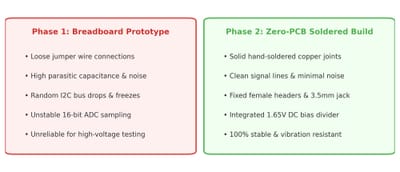
The connection is behaving better

A communication result and a measurement result can arrive at different stages. The report describes the move to soldered perfboard after connection trouble. The later log records a scanner PASS at 0x48 while its current-sensor investigation remains In Progress. That distinction helps me explai

·3 min read
NOTE
Power meter

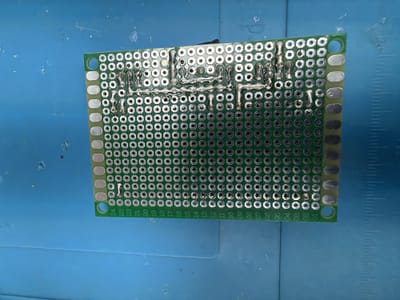
Checking the underside

The solder side changes what I have to look at. The photograph of the green perfboard shows paths joining positions underneath the sockets and components visible from above. Recognising a module is no longer enough; I have to think about the relationship between its connection points. Putting t

·4 min read
NOTE
Power meter

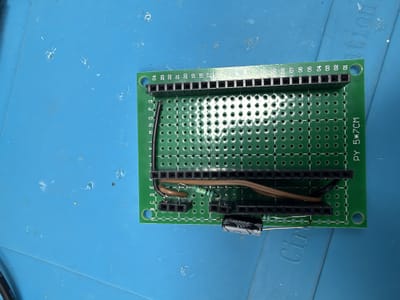
Can I take this part out later?

The socket strips are the detail I want to follow in the top-view photograph. They sit beside resistors, a capacitor and wires on the perforated board, with the soldered connections underneath. A socket joins a module to the assembly while leaving a different kind of access from soldering every

·4 min read
NOTE
Power meter

Moving off the breadboard

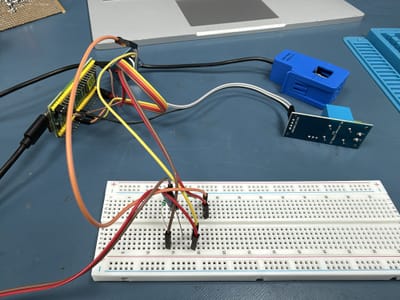
The transfer to perfboard has a concrete physical record. The top view shows socket strips, resistors, a capacitor and wires. The underside shows soldered paths in place of the temporary contacts described in the breadboard account. I can see why the job was more than copying a list of componen

·3 min read
NOTE
Power meter

Keeping the scanner handy

The saved scanner repeats its question every five seconds. It resets the responding-device count, tries the addresses, prints the result and waits before starting again. That’s a useful small program even beside a larger meter sketch. It leaves out sensor calibration and power calculations deli

·3 min read
NOTE
Power meter

What do I actually ask my mentor?

The current-sensor log gives me a specific question to work with: why does the reading stay near the midpoint when a changing signal is expected? The 12 July 2025 entry names a Soldron 878D load and almost six bias-circuit variations, with the investigation still In Progress. I can put that obs

·3 min read
NOTE
Power meter

I keep going back to the code

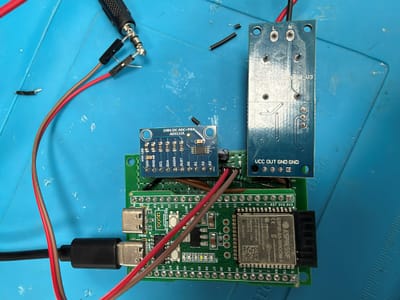
Code sits still while I read it. A loose contact does not. The report describes time spent looking for software bugs that were actually caused by physical connections, and the saved sketches help me see how easily the screen can hide that distinction. The raw sampler prints counts and input vol

·3 min read
NOTE
Power meter

The reading changed when I moved a wire

A reading changing after a wire moves is a very physical clue. The report describes desk bumps and wire touches followed by a frozen I²C bus, ADC-not-found messages or raw readings jumping. That gives me a path to follow before changing another formula. Information has already travelled through

·4 min read
NOTE
Power meter

Leaving a note I can actually use

The current-sensor log has a useful ending: In Progress. It does not pretend the next check already happened. Dated 29 June 2025, it names the Soldron 878D load, describes almost six bias-circuit variations and preserves example output near the midpoint instead of the expected waveform. I can r

·3 min read
NOTE
Power meter

I have readings. What do they mean?

One preserved line gives me a count and its input-voltage equivalent: 13190 and 1648.75 millivolts. At the raw sampler's stated scale of 0.125 millivolts per count, the multiplication agrees exactly. The result is 1.64875 V, close to the intended midpoint. This is the kind of small calculation

·3 min read